Find large files taking up hard drive space in Windows with WinDirStat
Almost all modern day computer users have run into the pesky problem of filling up a hard disk drive (HDD) to near capacity. But once you’ve filled up all of your disk space with large files, or just a boatload of smaller files, how do you find what files are eating up all of that space? There’s no easy way to do it natively in the Windows OS, but thankfully there are many 3rd party tools to help you on your quest to find and clean files from your HDD.
My favorite at the moment is a completely free utility named WinDirStat. It’s simple, easy to use and has a very helpful graphical interface (screenshot below) that shows directory trees and file types in colorful blocks. As the program’s Help section explains, it “Shows where all your disk space has gone and helps you clean it up.”
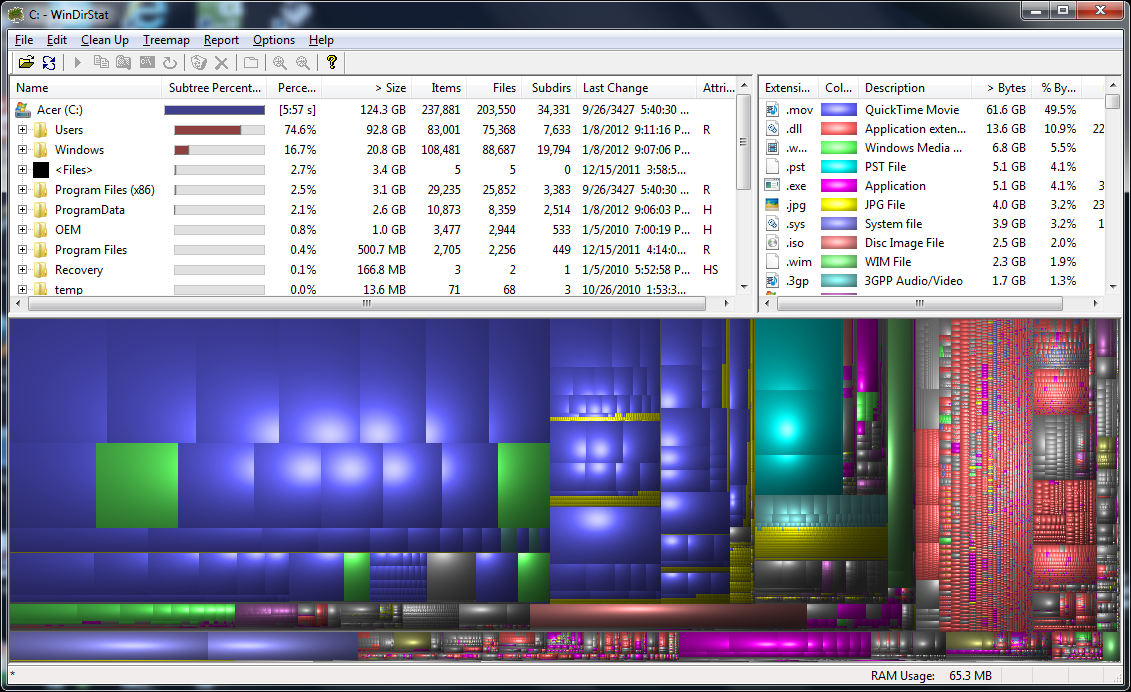
The image above (click for higher res) shows a completed WinDirStat scan on my Acer notebook’s HDD. I am just about at capacity and I needed to find out what was eating up all of my disk space so that I could delete some files.
I love how it color codes file types to give you a quick graphical view of how much the various file types are eating up your HDD. Notice all the blue? All of the blue blocks correspond to .MOV (quicktime video format) files that are taking up space on my hard drive. Quick time video files are by far the biggest hard disk space hogs on my system, eating up 61.6GB of disk space and 49.5% of my total HDD capacity.
With the disk space utilization information provided by WinDirStat, I will now be able to easily go in and copy off or delete the offending .MOV files, freeing up disk space and expanding the available free storage on my drive.
On other Windows systems, WinDirStat has helped me to find and eliminate temporary video editing program files and temporary ASP.NET files. Both of these file groups were eating up huge amounts of disk space and they weren’t needed on the systems at all.
What is your favorite Windows tool for analyzing disk space usage and identifying large files on your hard drive?



I still use JDiskReport from http://www.jgoodies.com/freeware/jdiskreport/
It hasn’t been updated in over two years but it does exactly what I need it to do.
I didn’t like WinDirStat when I tried it several years ago, perhaps I should give it another go.
Thanks for the heads up on JDiskReport, I’ll definitely check that out!
I like to use Space Monger (Ver 1.4) for Windows: http://www.sixty-five.cc/sm/v1x.php
Interesting to note that WinDirStat looks exactly like Disk Inventory X for Mac OS X.
@Matt: Nice, thanks for the tip on Space Monger!