Monthly ArchiveDecember 2006


Blu-ray &Software Wesley Novack on 30 Dec 2006

A free alternative to Microsoft Office

Today a friend of mine asked if I had Microsoft Powerpoint. I do have Microsoft Powerpoint, but it is a commericial piece of software that is a part of the Microsoft Office suite. This means that it can not be legally distributed to others without paying additional licensing fees. My friend claims that he needs Microsoft PowerPoint to complete his school project. He is wrong. So what does he need? He needs a piece of software that can create PowerPoint compatible documents.

ooo
Enter OpenOffiice. The OpenOffice program suite is a completely free package of programs that can be used in the place of the costly Microsoft Office suite. OpenOffice is developed and produced by volunteer programmers and is available for anyone to download and use at any time. Microsoft Office can cost between $200 – $300, so using OpenOffice can save you a substantial amount of money.

I always recommend OpenOffice when people ask me about Microsoft Office. Personally, I have used OpenOffice many times to complete school projects and assignments.

All of these OpenOffice built assignments have been a great success. Just remember to save your OpenOffice projects in the appropriate file format to ensure that they will be compatible with Microsoft Office. If you have already used Microsoft Office, you should know the correct file format to save your OpenOffice documents to ensure compatibility. For example, Microsoft Word uses .DOC, PowerPoint uses .PPT and Excel uses .XLS.

Feel the power of open source! Download OpenOffice from here: http://download.openoffice.org/2.1.0/index.html
Website root: http://openoffice.org

Blu-ray Wesley Novack on 28 Dec 2006

Best free CD DVD burning software

cdbxpThis post is yet another that originates from a friend requesting computer advice from me. They asked me “What free software should I use to burn CD’s and DVD’s?”.

I recommend that Windows XP users get 2 seperate pieces of software for their CD and DVD burning needs. These two

applications are CD Burner XP Pro and IMGBurn. CD Burner XP Pro is a well rounded disc burning suite that supports both CD and DVD burning. It can convert MP3′s to native CD audio format, burn DVD movies and many other functions. IMGBurn is excellent for burning those ISO files or other image files such as those created from DVDShrink. IMGBurn also supports Windows shell integration, which means that you can rightclick on an ISO file in Windows explorer and choose “burn with IMGBurn”. Enjoy these excellent free applications!

Download CD Burner XP Pro from here or by clicking the image.
Download IMGBurn from here.

Blu-ray Wesley Novack on 27 Dec 2006

Protect your hotspot communications

If you own a notebook computer (laptop), chances are that you have already connected to an unsecured wireless network (hotspot) in the past, or you will need to do so in the future. Some people might even

connect to their neighbor’s unsecured wireless network without even realizing it! There are many places where you might want to connect to an unsecured wireless network including coffee shops, airports, libraries, schools and more.

So what exactly is an “unsecured wireless network”? It is a network that allows anyone to connect, generally to access internet resources. The problem is that an unsecured wireless network does not use any type of encryption technology. This means that any communication that you send or receive is transmitted in plain text format, which means that anyone can read it if they really wanted to. This is no good, especially if you need to send or receive sensitive information such as usernames/passwords, bank account information, emails, or other such items.

So what should you do to protect yourself? One option is to connect to your employer’s network via VPN (virtual private network). This will encrypt your traffic, but it is also sent through your employer’s computing infrastructure, so you should probably limit your communications to work related activities.

afSo how can you protect your personal communications when connected to an unsecured wireless hotspot? You can try out a free service and free software from Anchor Free named “HotSpot Shield”. When using HotSpot Shield, you are connected to the AnchorFree VPN system, which encrypts your traffic and prevents snooping eyes from accessing your data. Keep in mind that the company providing the service (AnchorFree) could see your information if they chose to, but it is a nice alternative to sending out all of your data in an unprotected, plain text format.

Blu-ray &Entertainment Wesley Novack on 25 Dec 2006

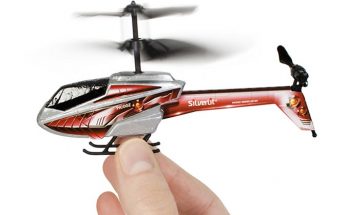
Picco Z mini helicopter

Happy holidays and Merry Christmas to all! As usual, I am sure there are many techie gifts that have been given and received by all of you. The Nintendo Wii, Sony PS3, Apple Ipods, and digital cameras from various manufacturers were all hot gifts for this 2006 holiday season. But you might have already guessed about these gift items on your own.

One excellent techie gift that you might not have known about is the miniature radio controlled Picco Z helicopter! According to hobytron, this little guy is “the Smallest and Lightest Micro R/C Helicopter in the World!”. The helicopter can sit on the palm of your hand and it can be used indoors. The Picco Z helicopter is a gift that any techie would love! Anyone who has wished or imagined piloting their own helicopter can do so now!

pzMost stores such as Radioshack and Toys R Us are completely sold out of this product. If you would still like to get your hands on one, your best bet would be to try online at hobbytron. The product runs for around $40. If you would like to see the Picco Z in action, head on over to YouTube.com & search for “picco z”. Thanks to Dan Bell for the heads up on this one!

Blu-ray Wesley Novack on 23 Dec 2006

Limited Internet access

I currently have very limited access to the internet, so the site may not be updated for a short period of time. I have had to move TWICE in the past two weeks, and I am in the process of getting connected at the (second) new place. More updates from WesleyTech.com in the near future. Thanks for reading. :-)

Blu-ray Wesley Novack on 20 Dec 2006

Best way to sign up for High Speed Internet

Are you thinking about signing up for a high speed internet (HSI) service? Perhaps you are finally ready to make the leap onto broadband. Maybe you would like to switch from DSL to cable or possibly you are moving soon or have just recently moved. So what is the best way to sign up for high speed internet? The first thing that might come to mind is “Just call up the service provider and request the service”. Well, that is wrong! So what is the right answer?

ccThe best method is to go visit a Circuit City store and sign up for High Speed Internet there. I just signed up for Cox High Speed Internet at Circuit City. Because I signed up at the store, I was able to take advantage of multiple signup deals offered exclusively at Circuit City. I purchased a Motorola Surfboard cable modem for $80 and it included an $80 mail in rebate. I was given a mail-in offer to receive a $175 Circuit City gift card for signing up for High Speed Internet with them. Finally, I was given 50 free music downloads. The modem is optional. If you already have a compatible high speed internet modem, you can skip the modem purchase and just go for the $175 gift card offer and the free music downloads!

If you move often or switch service providers routinely (example: from DSL to cable and vice versa), these sign up offers at Circuit City can prove to be extremely lucrative for you! I hope this helps some of you get the most out of your high speed internet sign up. If you know of any other methods to obtain high speed internet sign up benefits or offers, I would love to hear them. Please reply to the article and let me know.

Blu-ray Wesley Novack on 17 Dec 2006

Thank you to the seatbelt and airbag engineers!

sbIt was right around this time of year in 2005 that I was involved in an automobile accident in Tempe Arizona. I was cruising down Warner Ave on the way to the skatepark of Tempe around 9pm at night. At the time, I was driving a blue 1996 Nissan Altima GXE. I was about 1 mile from my destination, driving in the right hand lane on Warner, heading west-bound. A car in front of me started to slow down, so I engaged my left turn signal and moved into the left-hand lane. As I started to pass the slowing car, a pickup truck dashed out from a side street attempting to turn left through my path of travel. I was headed straight for the pickup truck, so I slammed on my brakes with all possible force. I felt the anti-lock brake mechanisms kick into affect, but my car still started to skid…

BAM!!! I slammed right into the side of the pickup truck at over 40 miles per hour. It was almost a perfect T-bone. I do not believe that I actually went unconscious at any time, but I was in complete shock. The cars’ airbag had deployed, punching me squarely in the face. I remember sitting in my car after the accident, motionless. The shock must have briefly paralyzed me. A passerby yelled at me, awakening me from my brief daze. I touched my face, expecting to find some cuts or blood but everything felt as though it was in order. I looked around and saw gas and fumes rising from parts of the car. I exited my car and gazed around at the accident scene. The front of my car was completely compacted. Gas was rising from the car. Liquid was dripping from the car and running down the road. I quickly retreated to the sidewalk at the side of the street and waited for police to arrive.

Thank you to the seatbelt and airbag engineers! I would have been seriously injured and possibly killed if I had not been wearing my seatbelt. The airbag helped me to walk away almost completely unscathed. I was also wearing a jacket, which prevented bruising and irritation from the seatbelt strap. So wear your seatbelt! It could save your life and prevent serious injury.

Next Page »