Burn Blu-ray’s: A How To Guide For Burning BD-R discs
Burning a BD-R (Blu-ray Disc Recordable) requires a few prerequisites. You’ll need a Blu-ray burner, a BD-R or BD-RE (Rewritable) disc, IMGBurn software and some content to burn. In this guide, we’ll assume that you are burning files extracted from a BD-ROM (Blu-ray Disc Read Only Memory) movie disc. To extract (rip) files from a BD-ROM movie disc, we recommend AnyDVD HD.
For this guide, we ripped the Blu-ray movie “Queen Rock Montreal & Live Aid”. This title is housed on a 25GB Blu-ray Disc. After ripping a disc or obtaining the Blu-ray video files through other means, you can burn the content onto a BD-R or BD-RE disc using ImgBurn using the following steps.
Blu-ray BD-R Burning Step 1) Open ImgBurn in Build Mode
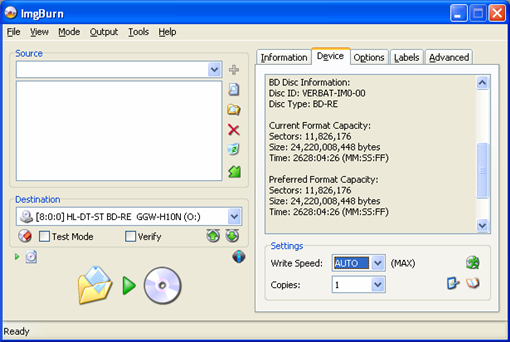
Open ImgBurn, click on the Mode drop down menu and select Build mode. On the Device tab, you can see useful Disc Information such as: Disc ID: VERBAT-IMO-000, which means that the disc we are using is manufactured by Verbatim. Disc Type: BD-RE, which means the disc is a Blu-ray Disc Rewritable. Size: 24,220,008,448 bytes or about 25GB.
Blu-ray BD-R Burning Step 2) Add your BDMV folder into the IMGBurn project
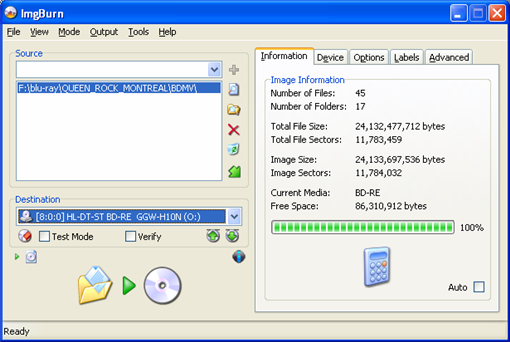
From Windows Explorer, you can drag and drop the BDMV folder of the movie you want to burn into ImgBurn. The latest ImgBurn will automatically create a CERTIFICATE folder so that you will only need to add a BDMV folder to the burning project. As our screenshot shows, our movie will fit a 25GB BD-RE with 86,310,912 bytes of remaining free space on the disc.
Blu-ray BD-R Burning Step 3) Click the Burn icon
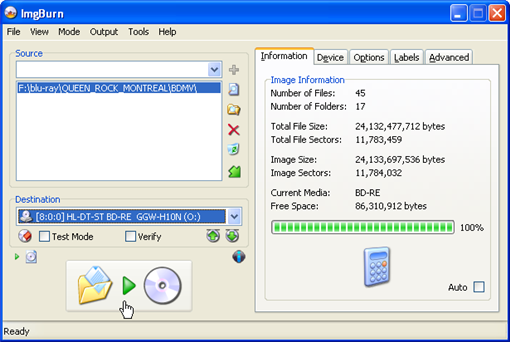
Shown below, where the mouse hand cursor is placed on the screenshot.
Blu-ray BD-R Burning Step 4) Select UDF
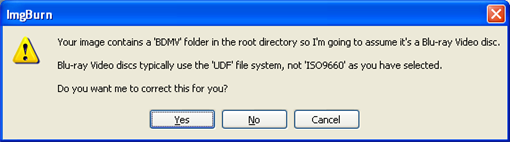
If you didn’t set the options to use the UDF file system, a warning window will appear, asking to correct the file system settings. Click Yes. Thanks IMGBurn!
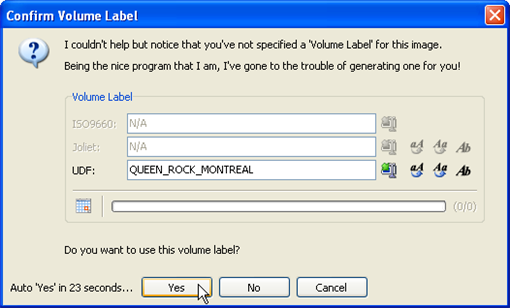
Blu-ray BD-R Burning Step 5) Confirm the Volume Label.
IMGBurn will help with that too! Click Yes – duh.
Blu-ray BD-R Burning Step 6) Verify your settings
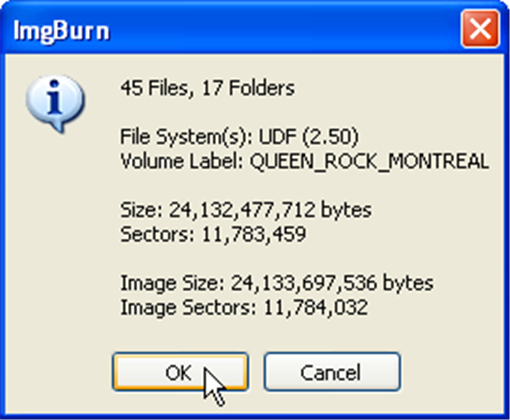
Next up, IMGBurn will display an informational window, allowing you to confirm all of your selections before the actual burning process starts. Click OK and the burn will start!
Blu-ray BD-R Burning Step 7) Burn baby burn!
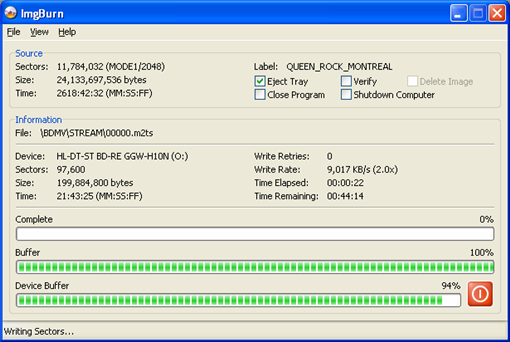
IMGBurn will display a burning progress window as the burn process progresses. In our example shown below, we are burning the blu-ray movie files on to a Verbatim BD-RE disc at 2x. The total writing time was approximately 45 minutes.
Blu-ray BD-R Burning Step 8 ) Verify the files on the disc
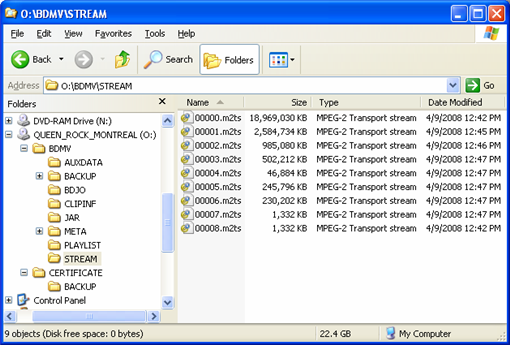
Once the IMGBurn burning process is completed, you can verify that your BD-R or BD-RE disc has the correct files on it by browsing with Windows Explorer. Our example screenshot below displays the content of the STREAM folder, which is where the movie is located. Note that the CERTIFICATE folder is created by ImgBurn. This certificate folder is necessary for the disc to play back correctly on some devices.
Blu-ray BD-R Burning Step 9) Play the movie from the disc!
Once you have verified that your Blu-ray movie files are now on your BD-R or BD-RE disc, you can test the disc by playing back the movie using your Blu-ray burner, a standalone Blu-ray player or a PS3. Enjoy your movie and happy Blu-ray burning!
Thanks to zevia from CDFreaks for providing screenshots and instructions.
Blu-ray burning software:
AnyDVD HD
DVDFab HD Decrypter
IMGBurn

How do you shrink 50gb movied onto a 25gb bd-r?
You don’t.
You can use Nero Vision (part of Nero 9 Ultra edition)
Don’t you mean Nero 8??
Thank you for the post. In step * (verify the files on the disc) your screen shot lists the file types as “MPEG-2 Transport stream”
The blu-ray disc I burned using this guide shows the file types as m2ts files and the blu ray player that came with my computer will not play the movie. Do you have any suggestions or advice on how to address this situation?
Thank you
Does your computer Blu-ray Drive play regular BD-ROM discs? You need special player software to be able to play back Blu-ray discs.
Did you follow all directions precisely? Are your m2ts files located in a subdirectory named “STREAM” with a parent directory named “BDMV” at the root of the BD-R/RE disc?
Do you have a PS3 that you could try playing the disc on?
Wesley, thanks for the response.
The computer I bought has a blu-ray read/write drive, however, I have not tried to play a regular BD-ROM disc yet. I will go rent one and try and play it soon.
Yes, I followed the directions precisely.
Yes, the m2ts files are in the stream file with a parent directory of BDMV.
Unfortunately, I do not have a PS3 player.
The software that came with my new computer is HP-DVDPlay and it is supposed to play both blu ray and dvd’s.
I will see if I can find a stand alone player or a ps3 to play the blu ray disc on.
Any other suggestions?
It could be your player software. Try the free trial of Power DVD 8 to see if that plays your disc. http://www.cyberlink.com/multi/download/trials_1_ENU.html
how do i burn just a m2ts file?
I ripped a blu-ray movie via AnyDVD HD and used ImgBurn to burn it to my media. I used all the appropriate settings as described here and the burn was successful. Now when I load it into my PC Blu-Ray player, the movie reads and shows the Paramount’s Hi-Definition screen, and then after that screen it stops and nothing else pops up. I can’t get to the movies menu select screen or any other screen for that matter. I tried the disc in my Ps3 and the same happens. The paramount Hi-Definition screen plays and then the screen goes blank. I have no idea why this keeps happening and was wondering if any of you had any ideas or have had this happen to you. It just seems like it won’t access any additional chapters on the disc. Thanks for your help.
On a side note: I tried playing the m2ts files straight off my HD and they work. I also tried playing the m2ts files off the BD-RE disc via windows explorer and they also work! So the movie burned fine.
Could have been a bad BD-R disc, especially if the files play fine from the PC. I would try another burn, maybe with a BD-RE at first to see if it works with a rewritable.
Nick,
I have attempted to burn about 8 blu ray discs using the method here. I have had success with 3 and the other 5 did not work. On a few of the ones that did not work for me I had the same issue as you describe with it playing the first screen or two and then not working after that. I too have played the m2ts files straight off the hard drive but the language is never in english and I am unable to switch languages this way. I do not have the answer on why or how to fix, but thought you might want to know you are not alone.
Hi Wesley,
I used Imageburn new version 2.4.2.
I have 2 drivers in my PC :
1)DVD-RW drive
2)HD DVD(HL-DT-ST BD-RE)drive
I rip Blu-Ray discs to My HDD succesfullty with Any DVD.
When I drag and drop a blu-Ray folder from my HDD to Imageburn to create an iso image, even I already choose BUILT and UDF according to your instructions, Image burn do not see my files.
On the DEVICE tab and the destination, it shows only my DVD-RW drive,not my Blu-Ray drive. I click the drop down icon to find my Blu-Ray drive but don’t see it.
So, in the information tab, everything is mark : Unknown.
I don’t know what happened? Do it use the right version of image burn for Blu-Ray disc?
If you have any idea about my trouble please help me. I appreciate your guide, it’s very clear and useful.
Thanks very much and have a good day.
BA TRAN
Does your Blu-ray drive show up in other programs? If not, it may not be installed correctly or have the correct driver loaded.
If your drive is showing up in other burning programs, IMGBurn might not support your drive, but that is unlikely. Check the official IMGBurn website for more info on drive compatibility.
i think this trying to burn blue ray movies is to much of a head problem. I here to many people having bad problems when trying to carry out the steps above. If you ask me i think it’s alot better to just buy the blue ray movies and not waits my times carrying out these steps. The only reason I’m saying this is because i was just going to go out and buy a blue ray burner to burn rented blue ray movies and I’m not even sure if that will even work. Well i thank you all for making me think first before waiting my money i can buy about 6 movies for 200 dollars and not have this many problems.
I am attempting to burn a blue ray disk. I have followed all the instructions. I have a 25GB disk and when I go to calculate its says 108%. Also I get an error that says “There does not appear to be enough space to burn this image.”
Image size: 24.921 GB
Disk Size: 23.098 GB
How is this possible if it is a 25GB disk? Any ideas on how to fix?
Ok. I have been reading all the comments and still havent found my answer yet. I use Any DVD-HD to back up the movie from a blu ray. Well when i looked at the m2ts files, the one that is the movie, I think, still is 31 gigs. Is there a way to burn it? Or am I doing something wrong?
You can burn it on to a BD-R DL (dual layer) disc if your burner supports it. I’m not sure how to shrink the larger movies to fit on a BD-R single layer disc.
Thanks for the reply. But the dual layer disc are higher than the original movie itself. Just hope they come out with something soon. Oh also, has anyone heard of a program that will burn the ps3 games?
@Tim
You can remove all the menu’s and extras to get it under 23Gig (The Packaging will say 25Gig but it is really 23Gig) Use BDinfo to find out what Stream and use tsmuxer to create the Disc then use Imgburn to create the iso which you can then burn with Nero or VSO Blindwrite.
But the Downside is not all will be under 23Gig but the Majority will.
I Know it is Long winded but it works and they will all play in any Blu-ray Player. (I am yet to test Playstation 3 However!)
just tried it for the 1st time with Wanted.
i got the movie to work on my PS3 but with no audio.
how will i know with future movies to pick the correct audio? trial and error..
thanks..
for to thank you for the how too..
great tutorial!
i burn the blue ray with nero and image burn.. power dvd wont play the movie but my ps3 did… i put an original blue ray on power dvd and works.. weird.. the movie backup works on ps3 but not on pc… help… what i am doing wrong
after tsmuxer,if needed to choose audio to fit on a 25gb. Are we using these files with the ones from anydvd hd?
well. I finally got my backup to play fine on my PS3.
Just took out the junk files in BDMV and kept the movie in it.. Burned both folders on my 25gb bd-re, and it played fined. it kept skipping at times. gotta put it on a bd-r now see if that corrects the skipping issues..
I’ve read that the PS3 has trouble playing back TDK BD-R/BD-RE media. FYI.
bd-re – memorex – plays but then skips
bd-r tdk — going test now…
I’m looking for the best way to back up a PS3 game disc. Software, Hardware, etc…….
If you want movie with dolby true audio you have to use tsremux if shrinking size of the movie to fit 25g. if not just put the movie files in imageburn and say yes to everything!! true audio every time!!
don’t forget BDINFO will tell you everything you need to know about a blu-ray movie! also TSMUXER will work for dts master audio! you can also cut the Beginning or end off, or split the movie in half to burn on 2 25g discs if you so choose!
Hi, I backed up doomsday following the steps above with the LG GGW-H20N with memerox bdr 1-4x but it would not play in ps3 nor lg bh200, nothing would come up, just a black screen. can someone suggest a good bdr media to try?
thanks
I just tried it again, this time with transporter 2 and I unchecked the “verify box”, it’s working now. I will watch the movie to make sure everything goes smoothly. Will report back later, if these media work, then frys has them 15 pack for 49.99 from time to time, currenty 89.99.
transporter 2 worked, it seems like I can only play non bd-live back up in ps3 and stand alone player, anydvd shows doom having bd-live disable, same with a few others and they would not play, i can rip however, anyone know how to get bd-live back up to play in ps3/standalone?
How do u squeeze a 50GB Blu-Ray into a 25GB? Easy use Ripbot264 🙂
wouldn’t that degrade the quality of the blu ray and defeat the its purpose? or is the loss in quality minor that it’s a better trade than backing it on a costly 50g?
when i pick the destination as the drive that has the disc which will hold the BDMV file, what do i pick as the ‘save as type’; is it .iso, .img, or all files?
im new at ripping blurays, but i ripped yesterday my foo fighters bluray, and when i burn it today and put it on my ps3 it read it as bd-r bdmv so as data disc right? can you explain me what to do? or how to fix this? thx a lot!
btw i did a full backup to bd-25! thx in advance!
hello can someone please help, I have followed all instructions here but cannot seem to play in my pioneer lx08, (lx08 says it plays bd-r+bd-re, but says on screen cannot play disc, then says BDMV, Does anyone know OR CAN HELP ME ON THIS?
THANKS
MICHAEL
Does anyone know what the average size of a BR movie is? Someone told me most movies are over 25GB so it would be better to burn to a DL. Although, DL’s are still very expensive.
Thanks in advance.
If you have problems fitting a bluray movie to a 25gig bluray look into converting bluray to.mkv the quality is really good I am also researching a way to shrink a movie so it will fit on the the 25 gig Iam sure this a way
I have a blu-ray player HDMI hooked up 1080P 42″ but play only blu-ray roms, As for burning I copy blu-rays the burn them on DVD the quality is still way nicer than a normal DVD almost as nice as the BLU-RAY.
Until blank blu-ray disc and burners come down in price and burning is easier it’s pointless when you can get blank DVD’s so cheap, the manute difference isn’t worth it…
To fit larger content on a single layer blu-ray
disk a good app for this is RIPBOT. It’s free
and it works. The more horsepower you have the
better.
hi please any one can help. i know how to do all the steps. when i come to play the blu rays on my computer which is connected to a 50″ lcd screen the blu-rays play croped little from top and little from bottom like if it was an mk file. i’m using power dvd 9 any idea what is the problem.
With HDD prices being way cheaper per GB than BD-R (7 cents/GB vs. 13+ cents/GB) why bother burning to disk? Why not just store on HDD array and either play from computer or stream to media player?
Great guide! Worked perfectly, burning BD’s 4eva
I have a question. Just got a Pioneer BDR-205BK and the Cyberlink BD Solution software (total crap IMO) came with it. The software is so slow it is pretty much unresponsive. I have Any DVDHD also (love it!)
We tried to burn “Salt” but there are 3 copies of the movie on one disc – theatrical, unrated, and extended and all that mess. How do you “author” the disc? I want to pick only one version of the movie and burn it instead of all three with trailors, etc…… any ideas? I wish DVD Shrink worked with blu-ray 🙁
@Brandi, you’ll have to do a remux to alter the Blu-ray Disc structure. Google search for “Blu-ray Remux” and you should find plenty of guides 😉
Hi, great tut, have followed it to the
letter and the whole thing burns fine. But when
I try to play the disc in my panasonic standalone
Player, the film starts, then stops then starts again,
It just keeps looping like this til I turn it off. I have tried
Using BD-R & BD-RE disk from verbatim, but still the same
Problem. The player is a brand new model with latest firmware
Installed, any ideas please?
I have also tried different films but get the same start/stop problem
So I know it’s not the film itself.
@ Wesley…..Thanks so much. I found the guides. Unfortunately, I do not have a degree in computer engineering so I don’t understand a word they are talking about, but I found the info LOL!
I now hate DVD Shrink because they don’t do blu-ray LOL that WAS the easiest program to use. I’m just gonna return the blu-ray burner. I would literally have to take a class to learn how to use that program. The instructions might as well be in French LOL! It’s no use buying 50GB blank discs either……they cost just as much as the movie to begin with!!! Oh well! Happy New Year!! 😀
I am not trying to rip/copy/reburn blu-ray movies from rental or anything like that. I have a 1080P cam-corder that stores in mp4 AVS/AAC format, and I have done lots of home videos. I am trying to author and burn Blu-Ray video discs to send to family living far and wide. I am using Windows XP SP3 with CyberLink Power Producer, Nero Vision 9 Ultimate, ImgBurn, etc, etc. I have tried many different ways to burn these and only one ever worked, but it was only a test of two clips and no menues. My Windows itself is on a FAT32 partition, but the clips and all work files, temp files, etc are on NTFS. Here’s what I did: Authored with Nero Vision — I had to render each clip to m2ts so that the build process would not take forever and crash somewhere leaving me to try again. This way with Nero Smart Burn it doesn’t re-render the clips — only the menus. I then used the m2ts files to author the video with titles, menues, chapters, slide show, intro video, etc. I burned to BDMV/Certificate folder, and used ImgBurn to actually burn to disc. My LG BH200 thinks it’s a data disc and won’t play it. A PS3 plays it though. Then I authored in Power Director and created the BDMV/Certificate folders and used ImgBurn and got same data-disc result. Next I used Nero Vision to author/burn directly to the disc and with same data-disc result. And I tried Power Director AND Power Producer with the same results. Finally I tried ImgBurn to create the disc image but it only lets me do an iso image — not a udf image. Even though I use the entire BD dialog and choose UDF 2.5, when it comes time to specify the image file it only gives me iso as a choice — even though it is on the NTFS partition. So I have about 8 Blu-Ray data discs that my stand-alone LG BH200 can’t play, but the PS3 will play. I’m going to install Windows 7 on another partition (multi-boot) and try it all over again. OK, any of you experts got any thoughts here?
OK, PS:
Now even my 2-clip test doesn’t play in the BH200. I had upgraded the firmware (or the software — the comments say firmware upgrade, but after installing it still says level 700, or whatever), and so does anyone know if the firmware upgrade may have damaged the ability for the BH200 to play BD-R home-burnt discs? Seems co-incidental. I doubt if ALL the discs are scratched or damaged, and since the one had previously played and now doesn’t, it seems suspiscious.
Don, you are gonna hurt yourself doing all that multitasking. I was bruised just reading about it. You have multiple contradictions in terminology in your post. If this explanation is the actual way you treated your video, then it couldn’t possibly playback as a regular type movie disc.
[note; weather or not you are on a FAT32 drive or a NTFS formatted drive is irrelevant]
m2ts is the proper container for a standard 1080p blu-ray video file. 1st step would be to rip your video file from your camcorder, into a m2ts video file.
step 2 is to create BDMV file folder, and, the subfolders like AUXDATA, BACKUP, BDJO, CLIPINF, JAR, META, PLAYLIST, STREAM. The video file (m2ts) goes into STREAM folder.
then step 3 would be to write the BDMV folder into an .ISO type file. (example = my_movie.iso) The .ISO file is an ‘image of the files’ that you will burn to disc, be it blu-ray or DvD or whatever. You must create the .iso file as described in the tutorial at the beggining of this topic, using ‘image burn’. After you create the .iso file (my_movie.iso) then you burn this to blu-ray disc.
Don, do some more reading on creating files and folders. The directories must be in the proper order with the proper files in each folder to work correctly.
Gazer, maybe my writing style confuses the narrative. What I was saying wass that I tried it with several different brands of authoring software. When I pre-render the mp4 clips from the camera to m2ts files (using Nero Vision) it is the same as what you say “rip from the camcorder to m2ts files”. I pre-rendered because Nero Vision (v10 with blu-ray plugin) has a tendency to crash and with so many large files, if it crashes 30% into it then it was a whole lot of hours wasted. Also, Nero Vision won’t re-render these clips because they would already have been rendered. I use these m2ts clips to author my compilation. Nero Vision (and Cyberlink Power Producer or Power Director) produces the correct BDMV/CERTIFICATE folders with all the correct info. ImgBurn has no problem producing the .iso image. I’ve done this and burned it to BD-R. I’ve also used ImgBurn to burn the BDMV folder directly to disc, and yes, it does create the CERTIFICATE folder. I’ve also used Nero Vision to burn the create the BDMV/CERTIFICATE folders directly on the BD-R disc. And I’ve used Cyberlink to burn the .iso file from ImgBurn to BD-R, and then I did another run where I used Cyberlink to burn the BDMV/CERTIFICATE folders (created by Nero) directly to DB-R. And finally I did exactly what you;s said in following the steps outlined in this tutorial. I don’t get my menues and title that Nero gave me, but at least it is a test, and it ALSO comes up as a data disc. So, I’ve tried many, many different scenarios and they all produce discs that the LG BH200 thinks are data discs. My test run of 2 of my clips worked until I upgraded the BH200 firmware (in order to implement the BD-Live function). So, PS3 plays all my discs, My various software players on my computer play all my discs as blu-ray movies, why won’t the LG BH200? Was the firmware upgrade faulty firmware? I am going to set the BH200 back to factory settings and see if they’ll play. I might lose my BD-live functionality, but it’ll at least be a test. And then finally I’ll try all my discs that I’ve created in all these scenarios in other set-top standalone BD players.
This does not work, I tried it with a DIO concert, and it DID NOT make the CERTIFICATE folder, so I have yet another 2.50 coaster. I am using a newer version than what you say you used, so they might have changed it to prevent piracy.
Jason
burning eror code “0”, why?
Any clues how to include 3D files to burn 3D bluray?
I know it’s possible to just drop m2ts with SBS (Side by Side) Half frame, but I think 3D Bluray uses left and right stream separately.
So how to mark those in files?
I managed to play 3D SBS m2ts via PS3 on Bravia 3DHDTV. But I’d like to make BD-R disc so I can send to friends, and they play it on any BD player.
Thanks,
p.s. great guide. Imgburn seems better than most of paid/bloated burning software.
D.
I have a ripped bluray movie but some how folder is missing certificate file. may i use bmdv folder in imageburn and make iso and it will get its certificate inclusive so i could play on my media server.
please advise.
thanks
Don – LG Blu-Ray players will not play videos on BD-R or BD-RE.
Per all LG Blu-Ray players’ owners manuals:
Blu-ray Disc
– Discs such as movies that can
be purchased or rented.
– BD-R/RE discs that contain
Music or Photo files.
I know the start of this thread is old but wanted to add my 2 cents as I think people still search for this stuff. Ive had good luck using DVD Fab Decrypter version 8.0.6.6 or higher and then using ImageBurn to burn BD-R’s. DVD Fab offers a 30 day free trial for the platinum that has all the features which includes the ability to do the main movie only and select what audio you want…And if its still too big you can compress it to the correct size for a 25 gig bd-r. I rarly have to compress but the few times I did I couldnt tell any difference in the original or the backup on my PS3 on a hi-def tv with 5.1 surround. Hope this helps someone as these type sites have always helped me.
I burnt my first home movie BD disk using Premier Elements 9 with LG burner. No menus stop or start markers.
Source is a new Sony HD camera that produces full HD m2ts files.
The Verbatim BD-R disk contains a 6gb file in its stream folder.
File on the disk plays perfectly in Windows Media Player in my computer and on a 2 year old Panasonic player.
My problem is it does not play at all in my new Pioneer BDP120 player -in fact gets stuck in “play” so I can’t open the tray without removing power.
Specs on player says it should play burnt BDMV/BDAV and AVCHD disks.
Any ideas what I might be doing wrong?
I wish there would be a program that takes you step by step in all the process to have a video I got with my camera (HD) using Vegas Pro 10 into a BD-RE prior to BD-R (to avoid wasting BD’s and money!!!). Any clues? Thanks.
You should be able to select BD-RE as an option in Vegas Pro 10 instead of BD-R. You will have to have a BD-RE drive in your computer. Check the manual http://sony-920.vo.llnwd.net/dspcdn/manuals/vegaspro100b_manual_enu.pdf
guys, try using ‘ dvd fab – 6.x’ program to bot rip an burn both dvd and blu ray movies.
you have to purchase it, but the results are great as i to have rented lots of blu movies and have backed them up onto ver-25gb disc.
they all work perfectly on standalone players ( used toshiba and sony players ) , have not used them on ps3 yet as i do not own one.
however when i rip, i exclude exerything except the movie, as it leaves more space on the disc for good movie quality instead of menus, etc. that will take up extra space comprising movie quality.
and i also leave on only relevent language and subtitles.
hope this help you.
@60.rscotta831 lists discs that LG players will not play. In my manual the very same words are used to describe “Playable Discs”. I have LG’s Model BX580 and plays “Blu-ray Disc
– Discs such as movies that can
be purchased or rented.
– BD-R/RE discs that contain
Music or Photo files” with no problems.
I have tried this method with 4 different movies & tried playing them in all different bluray players & nothing worked. I think bluray should just disappear & bring back hd just works much better & is alot cheaper than all this bluray bs
I am one of many who have attempted to burn Queens Rock Montreal with just a BDMV folder and I am afraid that IMGburn failed to create a certificates folder as you have described. So thats another 25Gb disc to throw away then.
This guide is really helpful. I managed to burn a disc. However, playback has been kind of strange. The blu-ray drive in my laptop (LG BT10N) seems to play the movie fine. My standalone player (Sony BDP-550) seems to skip a scene. However, the scene is there because when I rewind I can watch it. Any ideas why this might be the case. I used Verbatim discs. I want to figure out why this is happening so I can prevent it from happening in the future. I can always connect my computer to my television so it’s not a super big deal but it would be nice to just put it in the normal player.
Thanks!
the burn worked perfectly except there was no audio. perhaps I did some thing in wrong in the extraction process? i used DVDFab 10 (i think)
tia,
Thx ! I just burned my first Bluray Disc ! everything was fine no skipping ! I used DVDfab10 to rip and imgburn to burn !
Just download the new version IMGBURN and will work all bluray ripped.. i got it and works fines on my bd player, pc and ps3
USE DVDFAB 8 to rip the bluray after use IMGBURN to burn the files to bluray.. following the info above.. its easy and works.. :0))
Though I haven’t tested it yet, it seems you need to tell Imgburn to create the CERTIFICATE folder.
TOOLS/SETTING/BUILD/Create CERTIFICATE folder.
This should help answer some of the unanswered complaints above.
I’ve tried to burn a blu ray file exactly as described. Here’s the problem: It won’t play on my blu ray (home) player. it says Data disc and and won’t play. When burning with this program, how do you know if it’s burning as a Data disc or a Movie disc?
yo decripte con el dvdfab, y luego queme con el imgburn, hasta aca estamos bien… solo que cuando lo pongo en la ps3 me dice que DISCO NO VALIDO, y se acabo la pc lo lee perfecto.
alguna sugerencia?
Thank you for the breakdown, this was very helpful…….i can rip and burn retail blurays fine, but i have 2 issues if you can help me out with them:
1. Whenever i try downloading a 720p bluray mkv file from a site to a blank 25g bd-r and playing back in my ps3, I get audio and no video when using the process you’ve explained above (i have had one bluray movie work so far and that’s it).
2. Whenever i try downloading a 1080p mkv file, ImgBurn does not accept the file at all and doesn’t even attempt to convert it.
Does this make any sense how i explained? If so, can you please help…….thanks in advance!
Thank you for any other wonderful article. Where else may just anyone get that type of information in such an ideal method of writing? I’ve a presentation next week, and I am at the search for such information.
I used DVD fab 8 to burn a star wars clone wars season 1 disc 1 I shrieked it to the 25gb options but when I put it in my ps3 it reads data disc so I go to where the movie is and it says unsupported media. Also when I put it in my Sony blu ray player it just shows the disc loading does the same with power DVD 9. Anybody know what I did wrong.
Hello
I like to know if there is a program where I can burn bd blanks on my computer’s external bd writer and play them on a blu ray player for tv’s.
Please let me know
Thank you
So what is the difference for adding the certificate folder and the automatically one??
Because I did the automatically one and it burnt GREAT!! It works on my computer, my ps3 and my blu-ray player…
Someone please help me, I was trying to burn the blueray video disc with a movie but when i put the movie in my Ps3 it shows as an Data Disc and contains BDMV folder and Certificate, What am I doin wrong? is there any setting that I should be aware off? please help!!
hi just got my blu ray drive from Scan and rewrites and writes discs.
with 3tb harddrives and 2000 films in avi (divx or xvid,mkv)format ranging in size from 700mb to 7gb
including over 100 3D films.
all 3D films are side by side format.
I view via wireless from computer to samsung 40″ 3D active tv (scorce list drop to window 7 for list of films/pictures/music)does not need allshare supplied by samsung that does not work and as more updates per week then I have Hot dinners.
as a backup and to play on my Samsung blu ray player whick can play the above formats. why convert to only put two or three films on each disc when you can put 100 per disk?
Hi,
I am working on authoring a 50gb Blu-ray. Currently I am unable to get Adobe Encore to burn to disk, so I’ve created a Blu-ray folder from the program, then brought that into IMGburn. After a successful burn, my home Blu-ray player could not play it. It really just comes up as a data disk. I followed all the steps that are mentioned up top. Any reason why this is happening? I created an ISO from it and burned that through Encore, but even that didn’t play on the player. Any help would be appreciated.
Thanks.
First, I’m also new to burning Blu-ray discs. I’ve been burning DVDs for many years using AnyDVD & CloneDVD, but never BDs. I actually have alw In 2011 I purchased an LG 12x Internal Blu-ray Disc Player and DVD Writer. At the same time I upgraded to AnyDVD HD.
What happened to the rest of my comment? I didn’t save what I wrote but what is posted is only a fraction of what was stated. If you’re not going to post the whole comment then please remove the portion that is listed, as it means nothing!
Absolutely amazed that no-one has mentioned TMPGEnc will do anything you want – it costs money but you get what you pay for in this life.
Thank you, good tutorial! I made the shrinking with DVD Fab and all went well except that I couldn’t find a way to burn the resulted BD folder with the same software. That’s where IMGBurn came in handy!
I keep getting the message, “incorrect format.” What does that mean?
I have been using DVD Flick for all of my burning needs. It works quite well. When I do have a problem; I simply run the movie through Format Factory and select the correct format (even if it is AVI to AVI), click run and viola! It does seem to re-encode all the information and remeld them into a working file for burning and playing in ANY machine. Use ISO for European files PAL and when using -r or -re discs. -r is also used when making ps3 or ps2 discs.
hello
can someone help me I am trying to find a file of iso
so I can burn a movie on my Blu-ray burner I am new at this I don’t know what iam looking for I have frost wire to download my movies please someone help me
Can I use this software (IMGBurn) to burn a movie file 45Gb to 50GB BD-DL-RE ? (of course I have a BDXL Blu-ray Burner already!)
Or I can use this software to burn a video file 95 GB in to 100 GB BDXL disc ?
Thank you!
I am trying to burn a bunch of old movies (AVI) onto a 25gb BD-R to play on a bluray player.
My bluray burner works with these discs and i have used them for backing up my data but always used DVDs with convertXtoDVD and Dvdshrink for movie playing on my bluray player.
I have placed 20 movies (VIDEO_TS format) onto a BD-R and can view on my laptop but not my TV via my bluray player.
Any ideas? Free methods would be best.
just one question
how to burn a blu-ray movie disc from a movie downloaded from internet ,i mean i have a blu-ray movie downloaded from internet now i want to burn it on a blu-ray disc just like the original blu-ray discs.
quick reply will be highly appreciated
it is now 2016 you cant do it with out anydvd which sold there shsares to charge everyone twice ,which we are supposed to be glad about ,its so sad being charged than charged again and they will keep charging you when they meed the more Red Badger as slyfox is now c old to recharge everyome and they can keep changing name and country please be careful if you can get what you want done on IMG burn its great remember its 8 years later and the chargeses will be much much higher but if you have the money I
MG to SLYsoft to redbadber is really a lot so go straight to red badger if you have the money good luck
b\\adger as