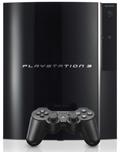
 A user over on the PS3NEWS forums has figured out how to rip, convert and playback Blu-ray movies straight from a PS3 hard drive.
Boot into Linux
The process involves booting into Linux on your PS3, running BackupBluray, using a file splitter and then re-encoding the video/audio to another format that can be played back in the VLC media player.
Not the easiest task
Looking at these steps, it does not appear to be the easiest process in the world. But hey, if you want to avoid using the handy dandy built in PS3 Blu-ray drive, this might be for you! I don’t really see it being a highly sought after function, especially since the PS3 hard drives are limited in size (40GB or 60GB) and the physical Blu-ray disc playback functionality is already available on the console. External hard drives can also be used though, as noted by the author of the guide.
Here’s a video of someone playing back a Blu-ray movie from their PS3 hard drive!
Blu-ray to HD DVD coming soon?
One of the more intriguing parts to this latest “hack” is that there is now a way to convert the Blu-ray video files to a more universal MPEG type format that can be fed into other authoring applications or video conversion utilities. With this type of capability, it should be possible to convert Blu-ray video files to an HD DVD type format. This might be good news for HD DVD adopters who would like to playback some of those exclusive Blu-ray movie titles on their HD DVD players. Then again, an HD DVD burner would be needed and probably dual layer HD DVD-R media too. HD DVD burners are in extremely scarce commodities at the current time and dual layer HD DVD-R is no where to be found. Where art thou HD DVD burners?
Backup HD DVD and Blu-ray Discs Easier!
 If you would like an easier method for ripping, copying or backing up HD DVD or Blu-ray Discs, you can use AnyDVD HD. AnyDVD HD allows you to copy HD video files off of your discs using Windows Explorer and has an easy to use interface with no command line complications. You can download a free 30 day trial of AnyDVD HD from here.

You can use an external USB HDD or install a larger HDD in the PS3 for more capacity. Many people have 120GB HDDs in their PS3.
Nice. I didn’t realize PS3 HDD swaps were being performed already. Just did a search and found a guide here:
http://www.gamersreports.com/article/43/
there are instructions in the ps3 manual on how to swap hdd’s, also the hdd cover says “detach this cover when removing the hard disk”… so im guessing sony already thought of this…
Aw, this was a very quality post. In theory I’d like to write like this too – taking time and actual work to generate a excellent article… but what can I say… I procrastinate alot and in no way look to have one thing done.
Fantastic site. Plenty of useful information here. I am sending it to several buddies ans additionally sharing in delicious. And obviously, thanks for your effort!